Eagle Eye
-
Posts
33 -
Joined
-
Last visited
Content Type
Profiles
Forums
Events
Blogs
Gallery
Everything posted by Eagle Eye
-
Expiry is in 5 years. You can find latest garmin maps here: http://www.mapmania.info/garmin/file/490-sri lanka-garmin
-
I installed the Sri Lankan map today following the trick given by Dananjaya. It is in fact same procedure given in Garmin Honda page. https://honda.garmin.com/honda/site/generalInstructions The trick is to replace the downloaded Europe map with the Sri Lankan map (and fool the system) to install it by assuming it's a map update to original Europe map. It worked...? Instead of the older map found in that thread, I used the latest updated map from Mapmania. Download the latest Garmin Map of Sri Lanka from this page. Make sure you rename the downloaded file to "gmapsupp.img" before copying it to your pendrive replacing the file there. The map above, and probably all others, are generated from Open Street Map project. It is a community based mapping tool to which I also contributed where possible. The accuracy and completeness of the maps depends on how the community contribute to it. My experience is it is very accurate. So, if you see any error, please correct it in OSM, so that it will appear in future updates. I think we can update the map again by simply replacing the "gmapsupp.img" with new one in the pen drive. So, keep your pendrive safe. Important, don't use pendrives created in other cars. Only use the one created from yours.
-
The Owner's Manual states: "Your vehicle is designed to operate on premium unleaded petrol with a research octane of 95 or higher. If this octane grade is unavailable, regular unleaded petrol with a research octane of 91 or higher may be used temporarily. The use of regular unleaded petrol can cause metallic knocking noise in the engine and will result in decreased engine performance. The long-term use of regular-grade petrol can lead to engine damage." Doesn't that mean using Petrol 95 is OK?
-
Many Thanks @Dananjaya Thennakoon, I got the SL map installed and running in my Civic 2018 (UK) following your guide. I used the last Sep 2018 updated map from Mapmania. Download the latest Garmin Map Here everyone. Make sure your rename the file to "gmapsupp.img" before replacing the one in your pendrive in step 4.
-

Honda Civic Hatchback 2018 OM
Eagle Eye replied to Ishantha84's topic in User Manuals & Service Manuals
Below is the link to Honda UK Civic 2017 owners manual. It's a 42 MB PDF. https://www.honda.co.uk/content/dam/local/uk/cars/owners/manuals/2017 Civic 5dr Petrol Owners Manual.pdf -
Civic 1.0L Turbo User Manual (2017)
Eagle Eye replied to Link's topic in User Manuals & Service Manuals
Following is the link to Honda UK manual. Its a 42 MB PDF file. https://www.honda.co.uk/content/dam/local/uk/cars/owners/manuals/2017 Civic 5dr Petrol Owners Manual.pdf -
Some information about the feature in fit/Jazz is here: https://www.hondacarindia.com/ownersmanual/webom/eng/jazz/2016/details/106278046-291072.html It says "The sensors detect if someone intrudes into the passenger compartment through a window or moves in the compartment, [and] ... the ultrasonic sensors may detect the vibrations on the vehicle or loud sound". So, try avoiding any objects hanging inside that can move. If you happen to park at a place with possible loud sounds (like those from Leylands), it may be good to keep the sensor off.
-
Honda Fit Shuttle 2011-15 Manual and More
Eagle Eye posted a topic in User Manuals & Service Manuals
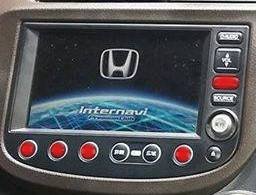
Hi all, I am new here. I've been using a Honda Fit Shuttle (2012) for about five years, and thought of sharing some useful information I gathered about it, since my search here did not show much (or have I missed them?) Japanese User Manual, and there is no English manual since it is a domestic model. But Honda Jazz manual is quite useful for many aspects. Below video is how you enter the secret menu in internavi premium where you can change the time. Your player may be slightly different, but find the corresponding buttons from the attached image.